
How to create this video
- 01Take a natural photoUse a photo of your face in daylight, without filters or heavy makeup, so the AI sees your real skin tone.
- 02Upload itAdd the photo to AI Color Analysis and confirm it is you, or someone who agreed.
- 03Create and saveSelect Create image, then open Library to download your color sheet.
What is personal color analysis?
Personal color analysis, also called seasonal color analysis, is a way of choosing clothing and makeup colors that harmonize with a person’s skin tone, eye color and hair color. Seasonal systems group people into palettes such as spring, summer, autumn and winter; the approach became widely known through the 1980 book Color Me Beautiful. LeafReel’s AI color analysis reads those features from your photo and lays out a palette on one page you can save or share.
Also searched as: color analysis AI, AI color analysis free, personal color analysis AI, seasonal color analysis AI, color analysis from photo, what colors suit me, ChatGPT color analysis prompt.
What does the AI color analysis sheet show?
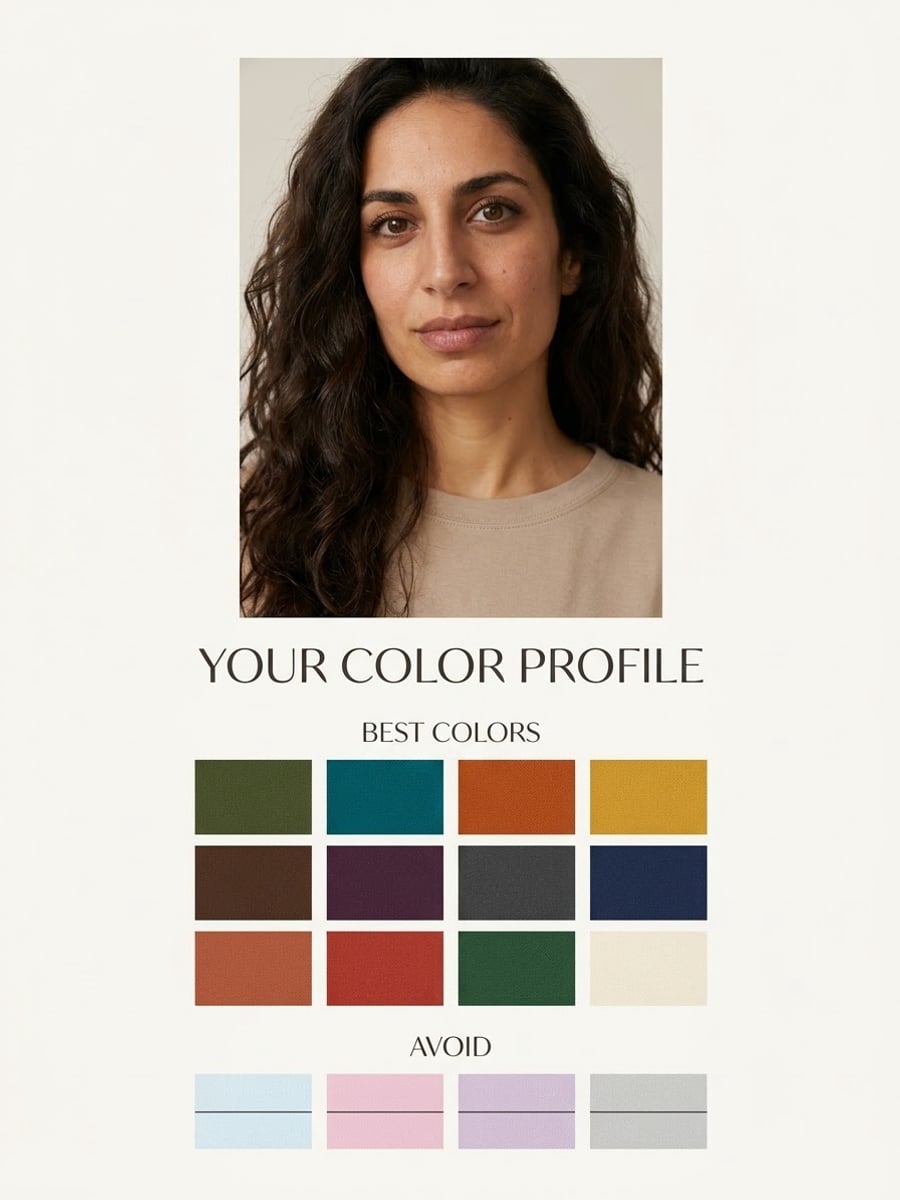
The AI color analysis sheet shows a softly lit portrait of you at the top, a grid of 12 best colors under the heading Best Colors, and a smaller row of 4 colors to avoid with a line through each. The headings are in English on every language version of the page.
Photo tips
- Daylight from a window gives the truest skin tone
- No beauty filters, colored lighting or heavy makeup
- Face fully visible, hair as you usually wear it
- One person in the photo
- Read the palette as a style idea, not a diagnosis
Effect details
- Input
- 1 face photo of one person
- Output
- Portrait, 12 best colors, 4 to avoid
- Aspect ratio
- 3:4 portrait
- Resolution
- 1K
- Cost
- First image free with a watermark, then 20 credits
- Failed job
- Credits or the free image returned
Frequently asked questions
Yes, once. Your first image on LeafReel is free, so your first AI color analysis costs nothing and carries a LeafReel watermark. Buying any credit pack unlocks that same image as the original file without the watermark. After that, each analysis costs 20 credits.
The AI looks at the skin tone, eye color and hair color in your photo and picks 12 colors that harmonize with them, plus 4 that may wash you out. It then lays the palette out under a portrait of you on one 3:4 page.
AI color analysis is a good starting point, not a professional result. Camera white balance, indoor light and filters all shift skin tone in a photo, so the palette can change between photos. For an exact reading, a trained color analyst who drapes fabrics in daylight is still the reference.
A front-facing photo taken near a window in daylight, without filters or makeup that changes your skin tone, works best. Avoid yellow indoor lamps, colored lights and strong shadows.
Yes. The AI keeps the face, skin tone, hair color and age from your photo; only the top and the background are styled for the sheet.
No. AI Color Analysis runs a fixed recipe, so the only input is your photo. To write your own prompt, use an image model such as [Nano Banana Pro](/models/nano-banana-pro).
Each AI color analysis costs 20 credits after your free image. The $9.90 One Video pack has 600 credits, enough for 30 images; on Pro each works out to about $0.17.
Yes, if your friend agrees to their photo being used. Photos of children need a parent’s or guardian’s permission, and photos of celebrities are not allowed.
A failed AI Color Analysis job returns its 20 credits automatically, or, if it was your free image, you can try again for free.