
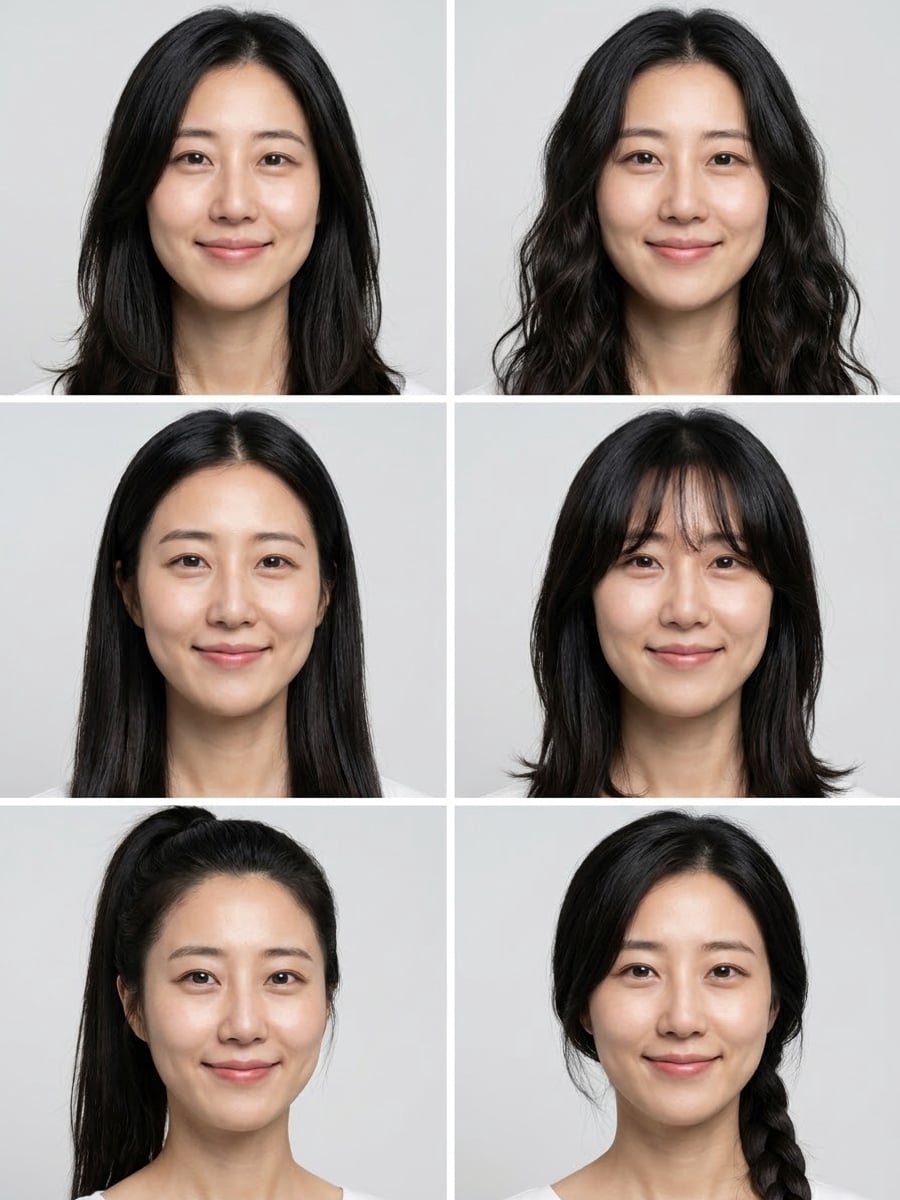
How to create this video
- 01Upload a photoAdd one clear, front-facing photo with your face and hairline visible.
- 02Pick a setChoose Long & Medium or Short.
- 03Create and compareSelect Create image, then open Library to save the sheet and show your favorite to your stylist.
Why try hairstyles with AI before a haircut?
A haircut is hard to undo, and it is difficult to imagine a new cut on your own face from someone else’s photo. Virtual try-on, previewing a style on a picture of yourself, solves that, and it is now common in beauty apps and salons. This page shows six cuts at once on your face, so you can bring a picture of the favorite to your stylist.
Also searched as: AI hairstyle changer free, AI hairstyle changer free online, see yourself with different hairstyles, see yourself with different haircuts, hairstyle try on, what haircut would suit me, AI haircut simulator, hairstyle changer no sign up.
Long & Medium or Short: which hairstyle set should I choose?
Long & Medium shows six longer styles: long soft layers, loose beach waves, sleek straight hair with a middle part, curtain bangs, a high ponytail and a side braid. Short shows six shorter cuts: a pixie, a chin-length bob, a textured crop, a slicked-back side part, short natural curls and a French crop. Both sets keep your face, expression and hair color in all six portraits, on the same gray backdrop.
Photo tips
- Front-facing photo with the hairline visible
- Pull hair away from the face for the most accurate preview
- Even light, no hat or sunglasses
- Show the sheet to your stylist with the style you like
- Hair color stays your own; only the cut changes
Effect details
- Input
- 1 front-facing photo of one person
- Output
- 6 hairstyles of you in one grid
- Sets
- Long & Medium or Short
- Aspect ratio
- 3:4 portrait
- Resolution
- 1K
- Cost
- First image free with a watermark, then 20 credits
- Failed job
- Credits or the free image returned
Frequently asked questions
Your first image on LeafReel is free, so your first result costs nothing and carries a LeafReel watermark. Buy any credit pack and that same image unlocks as the original file without the watermark. Each image after that costs 20 credits.
Upload one front-facing photo, pick Long & Medium or Short, and select Create image. You get six portraits of you with six different cuts in one image.
Long & Medium: long layers, beach waves, sleek straight with a middle part, curtain bangs, high ponytail, side braid. Short: pixie, chin-length bob, textured crop, slicked-back side part, short curls, French crop.
Not on this page. The sets are fixed and your hair color stays the same. For a bald head or a buzz cut, use [What Would I Look Like Bald](/image-effects/what-would-i-look-like-bald).
Yes. The Short set includes classic men’s cuts like the textured crop, French crop and side part, and every portrait keeps your face.
It is a close visual guide, not a promise: real hair texture, density and growth patterns can make the same cut look different in person.
Each hairstyle sheet costs 20 credits after your free image. The $9.90 One Video pack has 600 credits, enough for 30 images; on Pro each works out to about $0.17.
A failed hairstyle job returns its 20 credits automatically, or, if it was your free image, you can try again for free.