
How to create this video
- 01Choose one photoOne person, sharp and well lit, with the face clearly visible; a seated or half-body photo works well.
- 02GenerateConfirm you have permission to use the photo and select Create video. 500 credits are held for the job and returned if it fails.
- 03Add the sound and postDownload the MP4 from Library, upload it to TikTok or Reels and add the trend sound from the sound library.
How do I add the Window Peeper sound?
The Window Peeper AI video downloads with no audio. On TikTok, upload the MP4, tap Add sound and search "window peeper"; the sound used by other trend videos usually shows up near the top. On Instagram Reels, use the Audio button. Line the beat up with the moment the curtain closes. Which sounds you can use depends on your country and account type.
What is the Window Peeper meme?
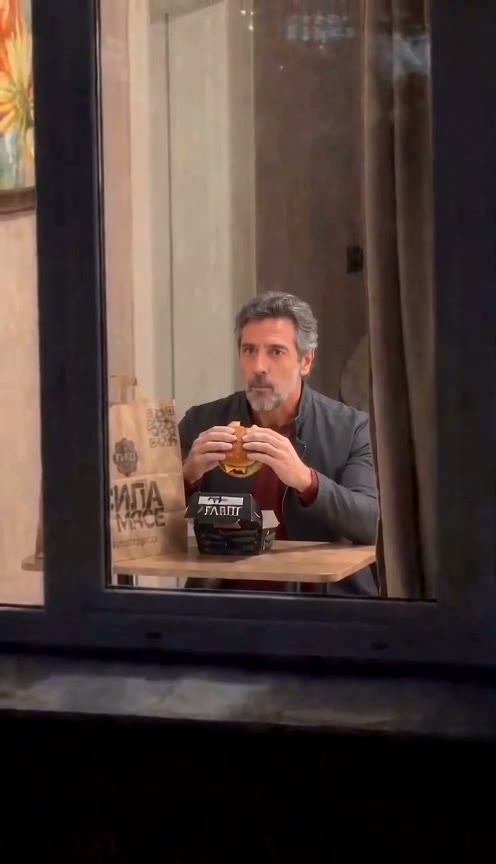
The Window Peeper meme is a short night-time clip that zooms from the outside of an apartment block into one lit window, where someone eating a burger notices the camera, holds a deadpan stare and closes the curtain. It spread on TikTok in October 2026 as a CapCut template, with people putting themselves, friends and famous faces behind the glass; the joke is that the person being watched catches the watcher. A Window Peeper AI video on LeafReel generates a new window scene starring the person in your photo. Nobody is filmed through a real window.
Also searched as: window peeper meme, window peeper trend, window peeper filter, burger window meme, caught eating at the window, guy closing curtains meme, closing curtains meme generator.
What else can I make with the Window Peeper effect?
Catch your roommate on a midnight snack run, make one for each coworker for the team chat, or post it as a reply to a friend who keeps checking your stories. Each new photo is a new 500-credit video; Creator works out to $5.00 per video and Pro to $4.29.
Photo tips
- One person only in the photo
- Face clearly visible, looking roughly at the camera
- A seated or half-body photo fits the window framing best
- The clothes in the photo are the clothes in the video
- Anyone under 18 needs a parent or guardian's permission; no celebrities or public figures
Effect details
- Input
- 1 photo of one person
- Duration
- 15 s
- Aspect ratio
- 9:16 vertical
- Resolution
- 480p
- Audio
- none, add it when posting
- Cost
- 500 credits
- Failed job
- credits returned automatically
Frequently asked questions
Upload one photo of a person on the Window Peeper AI page and select Create video. When the 15-second clip is ready, download it from Library and add the trend sound in TikTok or Reels. No prompt, template or editing app is needed.
It recreates the same meme. On TikTok it spread as a CapCut template; LeafReel generates the full window scene from a single photo instead.
Yes, it ends the same way: the person stares into the camera, gets up and closes the curtain.
Not on LeafReel. One video takes 500 credits, and the free trial is one watermarked 1K image, not a video. The lowest entry price is the $9.90 One Video pack; a failed job returns its credits.
500 credits. The $9.90 One Video pack includes 600 permanent credits: one video plus 100 credits for the image models. Upgrade to Creator within 7 days and the $9.90 counts toward the first month; Creator works out to $5.00 per video and Pro to $4.29.
Yes. The burger, the stare and the curtain are part of the meme and are built in. The person, face and clothes come from your photo.
No. With several people in the photo, the AI cannot tell who should be at the window. Crop to one person first.
A child, yes, with a parent or guardian's permission. Photos of celebrities and public figures are not allowed.
No. The whole scene is generated by AI from a photo you are allowed to use. Do not film people through real windows.
The 500 credits go back to your balance automatically.