
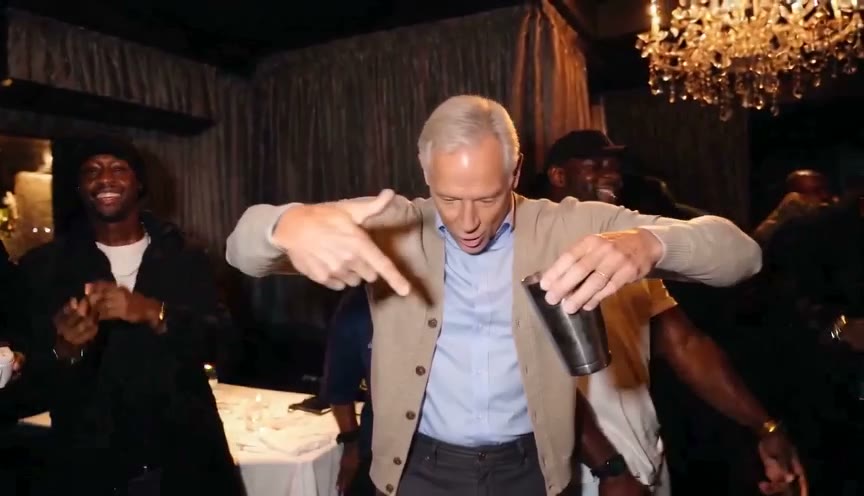
How to create this video
- 01Choose one photoOne adult, sharp and well lit, with the face and upper body in frame.
- 02GenerateConfirm you have the person's permission and select Create video. 500 credits are held for the job and returned if it fails.
- 03Add the sound and postDownload the MP4 from Library, upload it to TikTok or Reels and pick "Burning Bridges" from the sound library.
How do I add the Burning Bridges sound to my AI video?
The Burning Bridges AI video downloads with no audio, because LeafReel does not distribute the song. On TikTok, upload the MP4, tap Add sound and search "Burning Bridges Drake"; on Instagram Reels, use the Audio button. Start the track so that the "where she at" line lands when the hand goes up to the eyes at the end. Which sounds you can use depends on your country and account type.
What is the Burning Bridges AI trend, and where does "where she at" come from?
The Burning Bridges AI trend recreates a party scene from the music video for Drake's "Burning Bridges", directed by Theo Skudra and filmed at Sotto Sotto, an Italian restaurant in Toronto's Yorkville. In the scene, Drake moves through the crowded dining room and shades his eyes with one hand, searching for someone who is not there, which acts out the "where she at" line from the chorus. AI versions started on Higgsfield in September 2026 and spread across X, TikTok and Instagram Reels in early October, with athletes, TV characters and pets all getting the treatment. A Burning Bridges AI video on LeafReel does not reuse the music video footage: the AI generates a new party scene in which the person in your photo performs the moves.
Also searched as: where she at AI, where she at AI video, Drake AI video generator, Burning Bridges AI trend, Burning Bridges AI template, Burning Bridges AI edit, where she at Drake meme, burnin bridges AI.
What else can I make with the Burning Bridges effect?
Post a "where she at" for every friend in the group chat, use a photo in your team jersey for game day, or pair a dressed-down photo with a dinner-outfit one. Each new photo is a new 500-credit video; Creator works out to $5.00 per video and Pro to $4.29.
Photo tips
- One person only in the photo
- Face clearly visible, no sunglasses or masks
- Upper body in frame so the hand gestures look natural
- The outfit in the photo is the outfit in the video
- Adults only; no celebrities, public figures or minors
Effect details
- Input
- 1 photo of one adult
- Duration
- 15 s
- Aspect ratio
- 16:9 horizontal
- Resolution
- 480p
- Audio
- none, add it when posting
- Cost
- 500 credits
- Failed job
- credits returned automatically
Frequently asked questions
Upload one photo of an adult on the Burning Bridges AI page, select Create video, then download the 15-second clip from Library and add the "Burning Bridges" sound in TikTok or Reels. No prompt, template or editing app is needed.
Not on LeafReel. One Burning Bridges AI video takes 500 credits, and the free trial is one watermarked 1K image, not a video. The lowest entry price is the $9.90 One Video pack; a failed job returns its credits.
500 credits. The $9.90 One Video pack includes 600 permanent credits: one video plus 100 credits for the image models. Upgrade to Creator within 7 days and the $9.90 counts toward the first month; Creator works out to $5.00 per video and Pro to $4.29.
Yes. The "where she at" AI video and the Burning Bridges AI trend are the same clip: a party scene that ends with a hand over the eyes, searching the room. LeafReel makes it from one photo of an adult.
It makes the Drake "Burning Bridges" trend video starring the person in your photo. It does not generate Drake himself, his voice or the song.
"Burning Bridges" belongs to Drake and his label, so LeafReel delivers the clip silent. Adding the song from TikTok's or Instagram's own sound library is the way to post it with music.
No. The scene, the camera moves and the "where she at" ending are built in; you only upload the photo.
No. A CapCut template edits footage you already have; the Burning Bridges AI effect generates a new video from a single photo.
No. With several people in the photo, the AI cannot tell who should perform. Crop to one person first.
No. Photos of celebrities, public figures and minors are not allowed; use your own photo or one of an adult friend who agrees.
The 500 credits go back to your balance automatically.
No. LeafReel is an independent service with no link to Drake, OVO or his label.